Slide, Solve, and Win! Challenge Your Mind and Earn Rewards with BlazPay’s Puzzle Slider!

Step-by-Step Guide to Playing Puzzle Slider on BlazPay Slide, Solve, and Win! Challenge Your Mind and Earn Rewards with BlazPay’s Puzzle Slider ! Step-by-Step Guide to Playing Puzzle Slider on BlazPay Game Overview Description : Test your problem-solving skills with the Puzzle Slider!
Slide, Solve, and Win! Challenge Your Mind and Earn Rewards with BlazPay’s Puzzle Slider!
Step-by-Step Guide to Playing Puzzle Slider on BlazPay
Game Overview
Description: Test your problem-solving skills with the Puzzle Slider! Rearrange the shuffled tiles to recreate the original image before time runs out and earn exciting rewards.
Step-by-Step Instructions
Step 1: Connect Your Wallet
- Log in to the BlazPay Rewards Dashboard.
- Ensure your wallet is connected

Step 2: Select the Puzzle Slider Game
- Navigate to the Play & Earn section on the dashboard.
- Locate the Puzzle Slider game and click on Play.

Step 3: Preview the Image
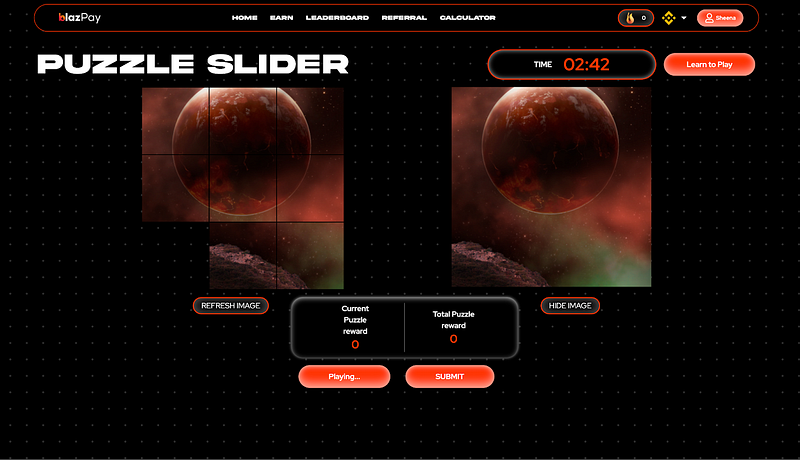
- The original image will be displayed on the right-hand side of the game screen.
- Take a moment to study the image before starting.

Step 4: Start the Puzzle
- Click the Start button to begin.
- The tiles of the image will shuffle into a grid with one empty space for sliding tiles.

Step 5: Solve the Puzzle
- Rearrange the tiles by clicking on them to slide into the empty space.
- Use logic and strategy to recreate the original image.

Step 6: Monitor Your Progress
- Keep an eye on the timer at the top of the screen. You must complete the puzzle before the timer runs out.
- Your Current Puzzle Reward will update as you progress through the game.
Step 7: Refresh or Show Image (Optional)
- If you’re stuck, click Refresh Image to start over.
- Use Hide Image to increase difficulty or Show Image for a hint.
Step 8: Submit Your Score
- Once you’ve successfully completed the puzzle or wish to stop, click on the Submit button.
- This will save your score and ensure your rewards are credited.

Daily Gameplay and Rewards
- Puzzle Plays: You can play the Puzzle Slider multiple times daily.
- Rewards Update: Rewards refresh every 24 hours, so return daily to maximize your points.
Pro Tips
- Plan Ahead: Visualize the correct positions of tiles before moving them.
- Start with Corners: Begin by solving the corners and edges to make the middle easier.
- Play Daily: Consistent gameplay helps you improve and accumulate rewards.
About the Author
Ryan Becker is a cryptocurrency researcher and analyst who writes about blockchain technology, DeFi ecosystems, and digital asset markets. With a strong focus on real-world utility and emerging Web3 trends, Ryan simplifies complex topics for everyday users while offering deep insights for advanced readers. His work aims to make crypto more accessible, transparent, and understandable for everyone.
View all articles by Ryan Becker →